
How to add a 2026 PIT Unsheltered Service in HMIS
Author: Amy Olsen-Highness| Date Created: 12/23/2025| Date Updated:
What this is
This article will teach you how to enter a service in HMIS for the 2026 PIT count.
What you need to know
Use these instructions only if you are collecting Unsheltered PIT information in Hennepin County.
Before you start
Before you enter a service, your client must be active in a PIT compatible enrollment in HMIS.
How can I tell if my client already has a PIT friendly enrollment?
- Go to client's record
- Look at their enrollments
- 1. Do they have an active enrollment where the end date is blank?
- 2. If yes, is the enrollment based in Hennepin County (has "HCC" in the name)?
If 1 and 2 is true: your client is active in a PIT friendly enrollment.
If 1 and 2 is not true, you will need to create a PIT friendly enrollment for your client.
Follow these steps
- Go to your client's record dashboard
-
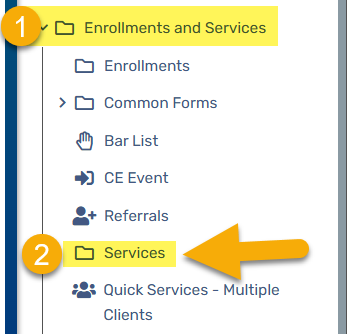
From the left menu, select the folder Enrollments and Services, then Services
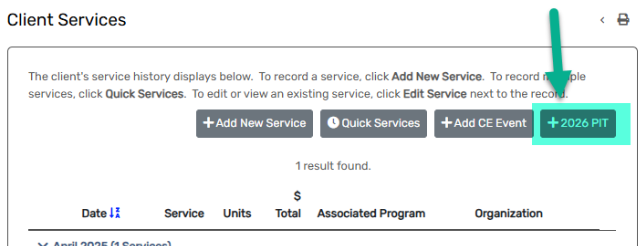
From the Client Services page, select 2026 PIT
Complete these four fields for your client's service:
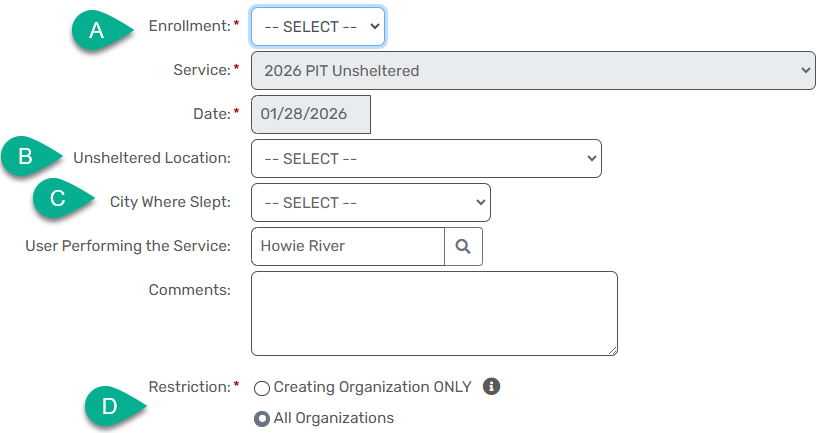
- Select the PIT friendly enrollment
- Select the right Unsheltered Location
- Select the city where your client slept on the PIT night
- Document your client's data sharing choice
- Finished? Click save
